def doc_theme():
    return theme_minimal() + theme(
        panel_grid_minor=element_line(color="gray", linetype="--"),
)Using Firecrown InferredGalaxyZDist objects
version 1.12.0
Purpose
This document serves as a guide for utilizing Firecrown’s capabilities in describing galaxy redshift distributions for cosmological analyses. The galaxy redshift distributions play a crucial role in modeling the distribution of galaxies within specific photometric redshift bins.
Overview
Firecrown employs InferredGalaxyZDist objects to encapsulate these distributions. These objects are essential for representing the redshift distribution of galaxies within predefined photometric redshift bins. Additionally, Firecrown utilizes metadata dataclasses to handle metadata and calibration data pertinent to cosmological analyses. These dataclasses can be constructed directly, extracted from SACC objects, or generated through Firecrown’s provided functionalities.
This document outlines the process of creating InferredGalaxyZDist objects directly and demonstrates their utilization in cosmological analyses.
Creating an InferredGalaxyZDist Object
The InferredGalaxyZDist object serves as the cornerstone for representing the redshift distribution of galaxies within a designated photometric redshift bin. Each bin is identified by a string identifier, bin_name, utilized by theoretical models to specify parameters specific to the corresponding redshift bin.
The InferredGalaxyZDist object can be created by providing the following parameters:
from firecrown.metadata_types import Galaxies, InferredGalaxyZDist
import numpy as np

z = np.linspace(0.0, 1.0, 200)
lens0 = InferredGalaxyZDist(
    bin_name="lens0",
    z=z,
    dndz=np.exp(-0.5 * ((z - 0.5) / 0.02) ** 2) / np.sqrt(2 * np.pi) / 0.02,
    measurements={Galaxies.COUNTS},
)
This dataclass can be serialized, but the resulting object will not be human-readable. To obtain a human-readable format, Firecrown introduces generators that describe the data layout in a more readable way. This is described in the tutorial on inferred distribution serialization.
Creating a TwoPointCell Object
The TwoPointCell object is used to encapsulate the two-point correlation function in harmonic space. Using the lens0 object created above, we can create a TwoPointCell object as follows:
from firecrown.metadata_types import TwoPointXY, TwoPointHarmonic
from firecrown.generators.two_point import LogLinearElls

lens0_lens0 = TwoPointXY(
    x=lens0,
    y=lens0,
    x_measurement=Galaxies.COUNTS,
    y_measurement=Galaxies.COUNTS,
)
# Note that we are leaving out the monopole (l=0) and dipole (l=1)
# terms. Firecrown allows their inclusion, if you so desire.
ells_generator = LogLinearElls(minimum=2, midpoint=20, maximum=200, n_log=20)

lens0_lens0_cell = TwoPointHarmonic(XY=lens0_lens0, ells=ells_generator.generate())
The TwoPointHarmonic is created by providing the TwoPointXY object and the ells array. The reason for separating the TwoPointXY and TwoPointHarmonic objects is to accommodate the creation of other types of two-point correlation functions. For example, from a TwoPointXY, one can also create a TwoPointReal object for the two-point correlation function in real space, or a TwoPointCWindow object for the two-point correlation function in harmonic space with a window function.
Creating a TwoPoint Theory Object
The TwoPoint object is used to encapsulate the theoretical model for the two-point correlation function. Using the lens0_lens0_cell object created above, we can create a TwoPoint object as follows:
from firecrown.likelihood.two_point import (
    TwoPoint,
    TwoPointFactory,
    NumberCountsFactory,
)
from firecrown.metadata_types import TwoPointCorrelationSpace

# Generate a list of TwoPoint objects, one for each bin provided
all_two_points = TwoPoint.from_metadata(
    [lens0_lens0_cell],  # Note we are passing a list with 1 bin; you could pass several
    tp_factory=TwoPointFactory(
        correlation_space=TwoPointCorrelationSpace.HARMONIC,
        number_counts_factories=[
            NumberCountsFactory(global_systematics=[], per_bin_systematics=[])
        ],
    ),
)
two_point_lens0_lens0 = all_two_points[0]
Above we use the NumberCountsFactory to create the TwoPoint object. The source factories are discussed in the tutorial on generators.
Depending on the theoretical model, the TwoPoint object may require additional parameters. To obtain a list of required parameters, one can use the following commands:
from firecrown.parameters import ParamsMap

req_params = two_point_lens0_lens0.required_parameters()
default_values = req_params.get_default_values()
params = ParamsMap(default_values)
Theory objects that require parameters are subclasses of Updatable. For these objects, the required_parameters method can be used to obtain the list of required parameters through the RequiredParameters object.
The get_default_values method returns a dictionary containing the default values for these required parameters. This dictionary is then used to create a ParamsMap object.
In this example the default_values dictionary includes a single parameter lens0_bias, with a default value of \(1.5\). Note that the parameter names are constructed using the bin name and the parameter name, separated by an underscore. Consequently, parameters specific to a bin will have the bin name as a prefix.
Code
import yaml
from IPython.display import Markdown

default_values_yaml = yaml.dump(default_values, default_flow_style=False)

Markdown(f"```yaml\n{default_values_yaml}\n```")lens0_bias: 1.5Now, we must configure the cosmology and prepare the two-point statistics for analysis:
from firecrown.modeling_tools import ModelingTools
from firecrown.ccl_factory import CCLFactory
from firecrown.updatable import get_default_params_map
from firecrown.parameters import ParamsMap

tools = ModelingTools(ccl_factory=CCLFactory(require_nonlinear_pk=True))
params = get_default_params_map(tools, two_point_lens0_lens0)

tools.update(params)
tools.prepare()
two_point_lens0_lens0.update(params)
theory_vector = two_point_lens0_lens0.compute_theory_vector(tools)
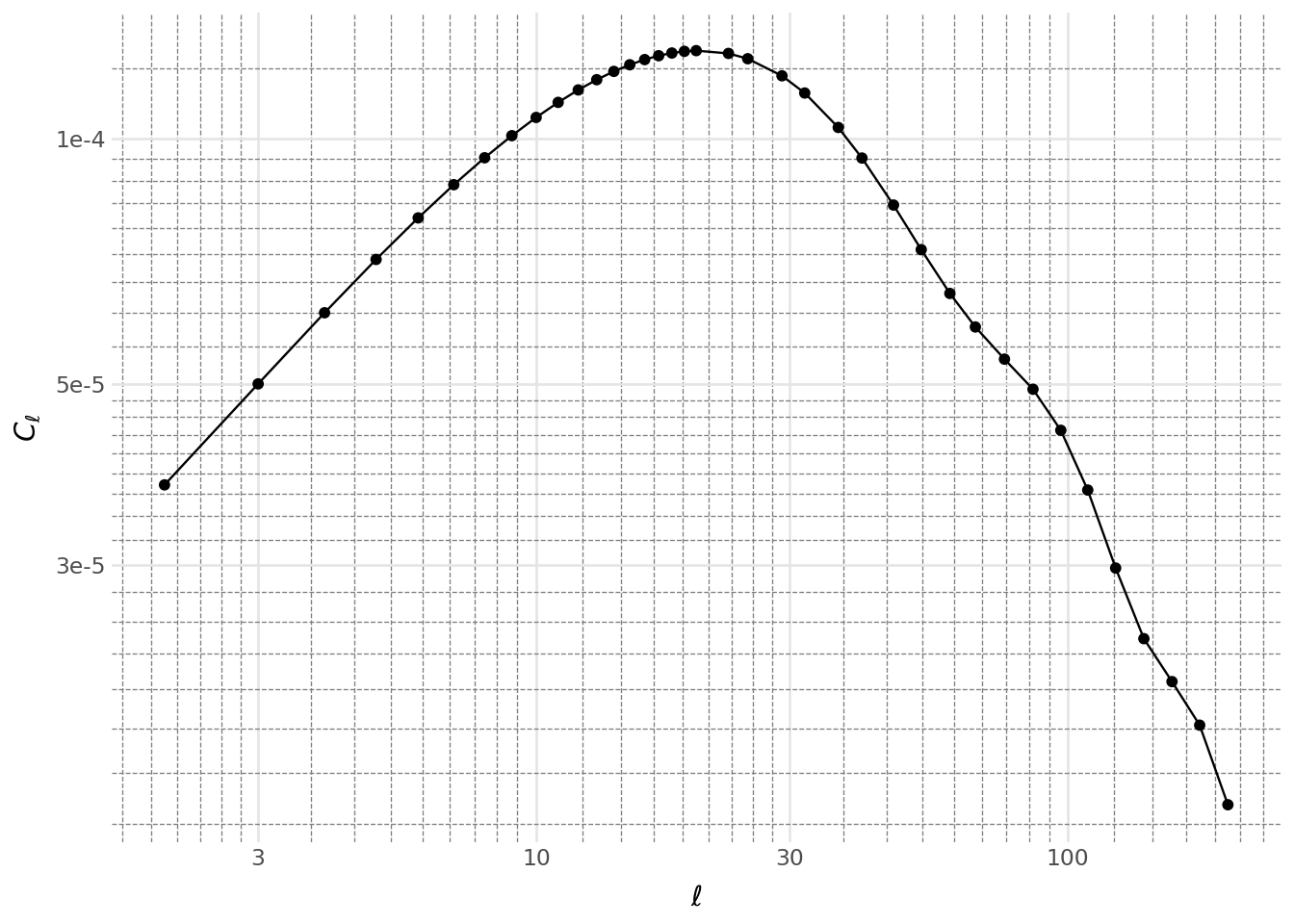
Below, we plot the two-point correlation function for the bin pair (lens0, lens0):
Code
from plotnine import *  # bad form in programs, but seems OK for plotnine
import pandas as pd

# The data were not originally generated in a dataframe convenient for
# plotting, so our first task it to put them into such a form.
# First we create a dataframe with the raw data.
data = pd.DataFrame(
    {
        "ell": two_point_lens0_lens0.ells,
        "Cell": theory_vector,
        "bin-x": lens0_lens0_cell.XY.x.bin_name,
        "bin-y": lens0_lens0_cell.XY.y.bin_name,
        "measurement": lens0_lens0_cell.get_sacc_name(),
    }
)

# Now we can generate the plot.
(
    ggplot(data, aes("ell", "Cell"))
    + geom_point()
    + geom_line()
    + labs(x=r"$\ell$", y=r"$C_\ell$")
    + scale_x_log10()
    + scale_y_log10()
    + doc_theme()
)
Conclusion
This document has provided an overview of Firecrown’s capabilities in representing galaxy redshift distributions and utilizing them in cosmological analyses. The InferredGalaxyZDist object encapsulates the redshift distribution of galaxies within predefined photometric redshift bins. The TwoPointCell object is used to encapsulate the two-point correlation function in harmonic space, while the TwoPoint object encapsulates the theoretical model for the two-point correlation function. These objects are essential for modeling the distribution of galaxies within specific photometric redshift bins and are crucial for cosmological analyses.
The following tutorials will delve deeper into the creation of metadata dataclasses, the generation of two-point statistics, and the utilization of source factories for theoretical models.